Essential Tips to Successfully Bridge the Gap
As a multi-media designer and print operator, I’ve experienced both sides of the spectrum — the creative world of design and the meticulous process of print production. It’s often said that the disconnect between graphic designers and print operators is vast, and that’s true. But despite these differences, both roles are deeply interdependent, and understanding each other’s challenges is key to producing exceptional work.
In this article, I’ll share essential tips to help graphic designers and print operators work together seamlessly. We’ll explore common challenges, practical solutions, and insights that will make the difference between a good design and a flawless print. Whether you’re a designer, a print operator, or simply curious about the industry, this guide will help you successfully bridge the gap between creativity and technical execution.
How Graphic Designers Can Adapt Digital Designs for Print
Graphic design is often tailored for digital platforms, while print design requires meeting specific technical standards to ensure accurate reproduction on physical materials. Here’s a quick comparison:
| Aspect | Digital Design | Print Design |
|---|---|---|
| Resolution | 72dpi | 300dpi or higher |
| Colour Mode | RGB | CMYK |
| File Format | PNG, JPEG | PDF (high quality) or AI/EPS |
| Margins | Edge-to-edge | Requires bleeds and safe zones |

Challenges Print Operators Face When Working with Graphic Designers
From my experience, here are the most frequent issues print operators face and their impacts:
Resolution Problems
Images designed at 72dpi (suitable for screens) appear blurry in print. Print-ready designs must use images at 300dpi or higher for clarity and quality.
Colour Mode Mismatches
While screens use the RGB colour mode, printers rely on CMYK. If a design isn’t converted, printed colours may look muted or incorrect.
Font Issues
Unembedded or unoutlined fonts can default to system fonts, ruining typography. Always outline or embed fonts before exporting files.
Complex Layers and Effects
Designs with excessive layers, shadows, or transparencies can confuse print software, causing misprints or processing errors.
File Size Problems
Large PDF files can cause delays, crashes, or rejected uploads. Proper export settings optimise file size without sacrificing quality.
Why Graphic Designers Must Prepare Files Correctly for Print Operators
Even with advanced tools like HP Latex printers or software like SAI Flexi, the quality of the output depends on how well-prepared the input file is. Here are a few common issues:
- Registration Marks: Designers often add these manually, but unless generated by print software, they may not align with cutting machinery.
- Gradients and Shadows: Overusing these effects without flattening them can cause inconsistencies in print quality.
- Layered Files: Printers work best with simplified files, so flattening or merging layers before exporting is essential.

Essential Tips for Graphic Designers to Create Print-Ready Files
To minimise delays and ensure smooth print production, follow these best practices:
Outline Fonts
Convert all text to outlines or embed fonts to prevent typography issues.
Optimise Resolution
Use images at a minimum of 300dpi for sharp, professional-quality prints.
Add Bleeds
Extend designs by 3–5mm beyond the trim line to account for cutting variations.
Convert Colour Modes
Work in CMYK for accurate colour reproduction during print.
Flatten Layers
Simplify your file by flattening complex layers and effects.
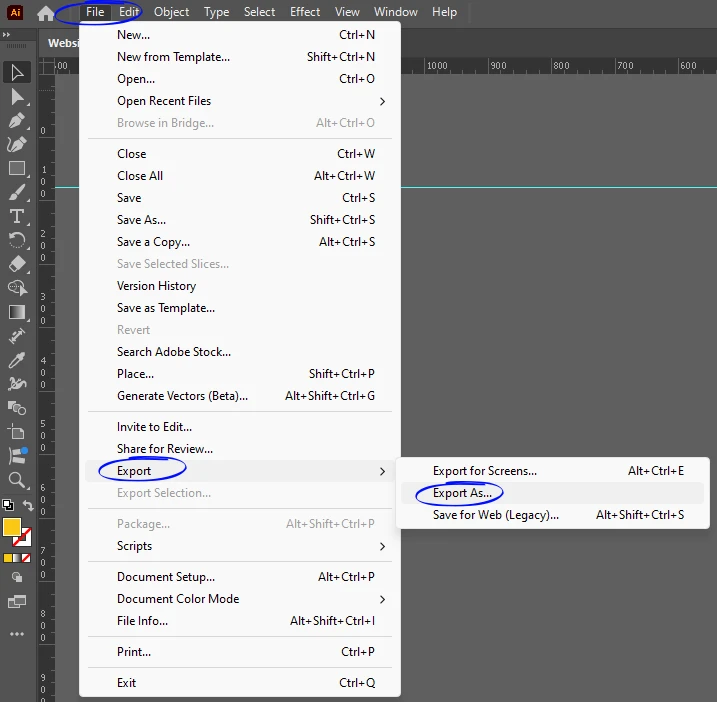
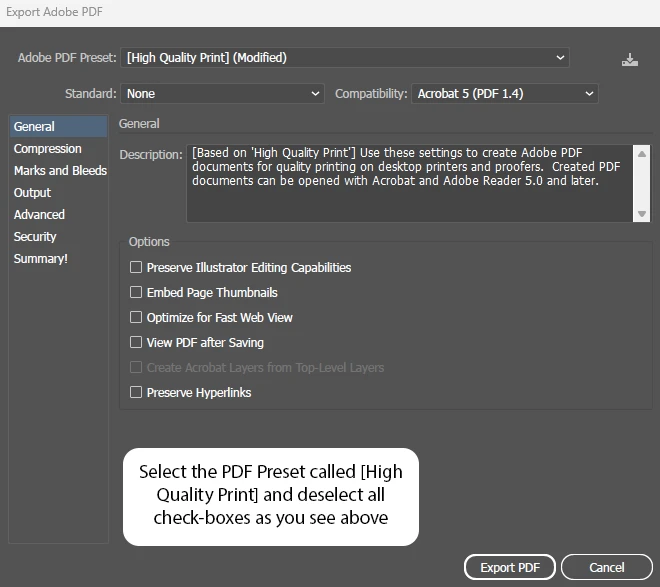
Export Properly
Use the “Export” function to save PDFs in the correct format and size.
How Graphic Designers and Print Operators Can Collaborate Effectively
The key to bridging the gap between multi-media design and print production is collaboration. Designers and print operators should communicate clearly to ensure mutual understanding of technical needs. Designers can request print specifications upfront, and operators can offer guidance on best practices.
As someone who works in both roles, I know that the creative process and technical production are equally important. By respecting each other’s expertise and working together, we can deliver designs that are both visually stunning and print-perfect.
Bridging the Gap
Bridging the gap between graphic design and print production isn’t just about solving technical issues; it’s about fostering collaboration and understanding. When designers and print operators work in harmony, they can create exceptional results that look just as good in print as they do on screen.
Whether you’re a designer, a print operator, or just curious about the industry, mastering these skills and principles will elevate your work. With the right approach, you can ensure your designs go from good to flawless — every time.